VHS Missing Data Detector Utility
The VHS Missing Data Detector utility searches the VHS and produces a report for point data that is missing from the VHS for a specified interval. This utility is useful if it seems that a current value service (CVS) is not reporting history for a particular point or points and you think it should.
Any point added for reporting purposes must report to the VHS. Otherwise, an error message appears, stating that those specific points are not history points and are not in the VHS.
The CygNet VhsMissingDataDetector utility is stored in the CygNet\Utilities directory (VhsMissingDataDetector.exe) on the host server.
Starting VHS Missing Data Detector
Installing and Launching
To install and launch (start) the application or utility using version management:
- Use CygNet Client Installer to install and launch the application. Once installed you can use CygNet Client Installer to start the application.
-OR-
- If previously installed, click Start > All Programs > CygNet > <name of the application or utility> or double-click the desktop shortcut.
Alternatively, browse to the CygNet\Utilities directory using Windows Explorer and double-click the program icon. You can also start an application or utility from a command line. These methods do not provide version management.
The VhsMissingDataDetector dialog box appears.
|
VHS Missing Data Detector Utility |
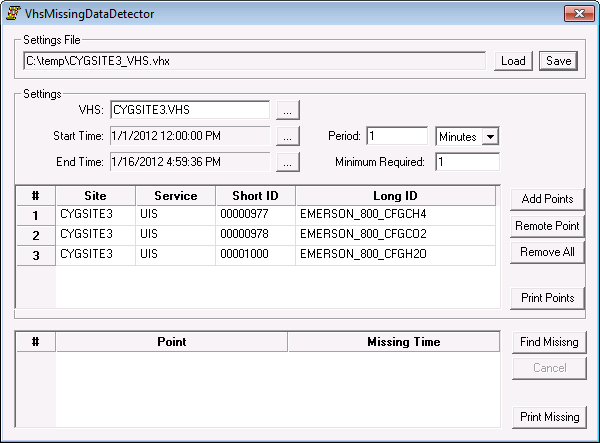
The VHS Missing Data Detector dialog box is divided into four sections:
- Settings File — where a new settings file can be created and saved for later use or a previous one can be used. (The settings file has a .vhx extension and is in XML format. The file specifies the criteria for finding any missing values from points that should be in the VHS.)
- Settings — where a valid VHS is selected and the time range and interval for finding the missing history values can be set.
- Points — which shows the selected points sorted by a full tag string: SITE.SERVICE.POINTID:LONGID. Points can be added or removed.
- Results — which finds those points that are missing values in the valid VHS, based on time range, interval, and minimum missing values required.
More:
 Setting the Criteria for Finding Missing Values


